T2125 Form Explained: How to Report Self-Employment Income in Canada
If you run a sole proprietorship, freelance, drive for Uber, or juggle a side hustle in Canada, tax season hits differently. You don’t get a neat T4 slip with your taxes pre-deducted. You’re on your own. Calculating net income is entirely on your shoulders, and honestly, it can get messy fast.
Enter the T2125 form. Officially, the CRA calls it the Statement of Business or Professional Activities. Unofficially? It’s just the form where you tally up what you actually made and subtract every valid business expense you can lay hands on.
Let’s break down how the T2125 form works, how to fill the thing out without losing your mind, and how to keep the CRA off your back while keeping more of your hard-earned cash.
What Is a T2125 Form and Who Needs to File One?
The T2125 form is a multi-page add-on to your standard personal T1 return. If you earned money from a business you run yourself, or as a partner in an unincorporated business, you have to attach one. Simple as that.
You’ll need a T2125 form if you make money doing things like:
- Freelance design, consulting, or contract work.
- Selling physical goods on Shopify, Etsy, or eBay.
- Delivery app driving or gig work.
- Trades, creative gigs, or running an independent practice.
- Rental activities where you offer extra services beyond just collecting rent.
Made $50,000? You file. Made $400 and spent $600 on supplies? You still file. Reporting a business loss on your T2125 form isn’t just about playing by the rules, it can actually reduce your overall tax bill if you have income from other sources.
Business Income vs. Professional Income: Which Section Applies to You?
When you open up the T2125 form, you’ll instantly run into a fork in the road: Business Income (Part 3A) vs Professional Income (Part 3B). Pick the wrong one and you’ll be re-doing your math midway through.
Business Income: This covers standard commercial stuff. Buying, selling, manufacturing, or general service work.
- E-commerce shops and retail
- Electricians, plumbers, and contractors
- Web developers and digital marketers
- Rideshare drivers and caterers
Professional Income: This is reserved for specialized professions managed by a recognized governing body or professional association.
- Lawyers, accountants, and notaries
- Doctors, dentists, and physical therapists
- Engineers and architects
Why does this matter? Professionals sometimes face extra hoops around Work-in-Progress (WIP) reporting. Oh, and if you happen to run both types of businesses under one roof? You’ll need to file separate T2125 forms for each stream. Fun times.
Step-by-Step: Filling Out the T2125
Filling this form out without organizing your receipts first is a recipe for a headache. Grab your spreadsheets, logbooks, and bank statements before opening the return.
Step 1: ID and Setup
Fill out your business details, fiscal year (usually Jan 1 to Dec 31 for individuals), and your 6-digit NAICS industry code. If you don’t know your NAICS code, the CRA site has a lookup tool.
Step 2: Calculate Gross Income
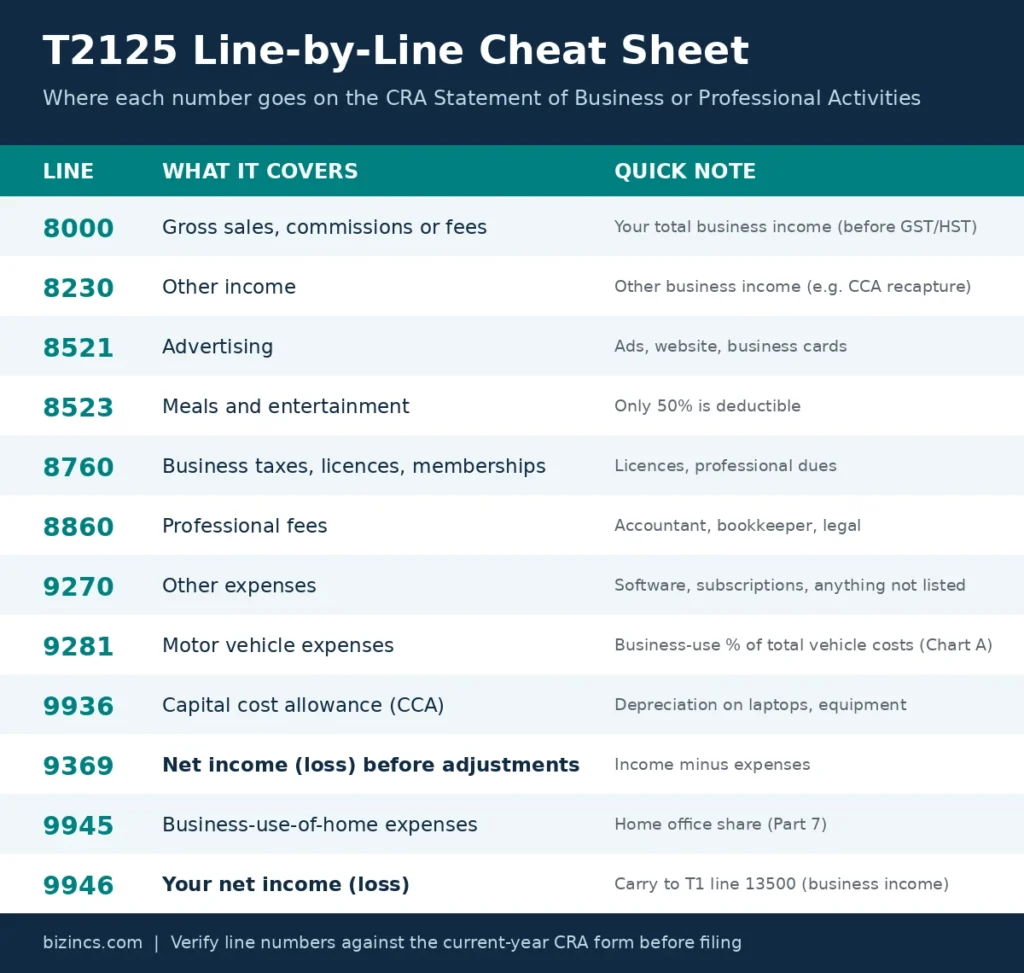
Add up every dollar that came in. If you collect GST/HST, make sure you treat it properly based on whether you use the Regular or Quick Method. Subtract your Cost of Goods Sold (COGS) if you sell physical inventory. Enter your total income on line 8000 (gross sales, commissions or fees).
Step 3: Operating Expenses
This is where you list operational overhead. Advertising, software, office supplies, domain names, bank fees, professional membership dues; tally them up and list them out. Each expense has its own line, for example advertising on line 8521 and professional fees on line 8860.
Step 4: The Heavy Hitters (Vehicle, Home, Assets)
- Vehicle (Chart A): Compare business km driven against total km. The resulting ratio determines how much gas, repair, and insurance money you get to deduct.
- Home Office (Part 7): Measure your workspace against the total area of your home. Apply that percentage to your utilities, internet, and rent.
- Capital Assets (CCA): High-cost gear like laptops or machinery can’t be fully written off in year one. You have to depreciate them using CRA’s CCA classes.
Vehicle costs total up on line 9281, capital cost allowance goes on line 9936, and your home office claim goes on line 9945.
Step 5: The Final Tally
Subtract your total expenses from gross revenue. The remaining number, your net business income or loss, gets carried straight over to lines 13500–14300 on your personal T1 return. Income minus expenses gives you line 9369 (net income before adjustments). After the home office deduction, line 9946 is your final net income, which you carry to your T1.
Before we run real numbers, here is a quick reference for the T2125 lines you will see most often.
What Expenses You Can (and Can’t) Claim
Lowering your tax bill is great. Getting audited because you tried to deduct your dog’s food as “office security” is not. Keep your write-offs realistic.
- Workspace & Utilities: Deduct a portion of your rent, heat, and internet based on workspace square footage. Do not try to write off 100% of your home rent or your personal cell plan.
- Vehicle Use: Deduct gas, repairs, and insurance proportional to your logged business drives. Do not claim mileage for personal errands or your regular commute.
- Professional Fees: Deduct lawyer fees, bookkeeping tools, and tax software. Do not write off personal legal help or non-business tax prep.
- Meals & Entertainment: You can claim 50% of meals with actual clients or business associates. You cannot write off your daily solo coffee runs or takeout dinners while working late.
- Tools & Tech: Deduct small tools immediately; depreciate expensive laptops or heavy machinery via CCA over multiple years. Specialized safety gear counts, but everyday designer clothes definitely don’t.
If you can’t prove a receipt was directly meant for earning income, leave it off.
Common T2125 Mistakes That Trigger CRA Attention
The CRA uses automated systems to flag returns that look weird compared to industry averages. Here are the easiest ways to land on their radar:
- Claiming 100% vehicle usage: Unless you own a dedicated commercial van that literally stays parked at a job site overnight, claiming 100% business vehicle use is essentially asking for a review. Keep a logbook.
- Co-mingling personal and business cash: Running grocery runs through your business account creates a nightmare audit trail. Open a separate business account, even a basic checking account helps.
- Overestimating home office footprint: Claiming your studio apartment is 80% dedicated workspace raises eyebrows fast. Keep your room measurements honest.
- Writing off capital assets all at once: Buying a $4,000 setup and expensing it under “office supplies” instead of setting up a CCA asset class is an extremely common flag.
- Ignoring payment processor income: Stripe, PayPal, and Square report transaction data. The CRA cross-references these numbers, so omitting online sales will catch up to you.
T2125 vs. Corporate Tax Filing: When Does It Make Sense to Switch?
At a certain point, filing a t2125 form every year starts feeling like throwing money away. Sole proprietor net income gets tacked directly onto your personal income, pulling you into higher provincial tax brackets that can top 50%.
When you incorporate, the t2125 form disappears entirely. Instead, your business files a corporate T2 return.
In Canada, active small business corporate income is generally taxed at a much lower combined rate (around 9% to 12.2%, though Ontario’s rate just dropped to 11.2% as of July 2026) on the first $500k. That means you can leave profit inside the corporate vault, pay a lower immediate tax rate, and only pay personal tax when you draw money out as a salary or dividend.
Signs it’s time to stop filing a T2125 and incorporate:
- You’re consistently leaving $30,000+ of profit untouched in your business account at year-end because you don’t need it for living expenses.
- Your overall net self-employment income is pushing past $80,000–$100,000 annually.
- Your work carries real legal liability, and you need a corporate veil to protect personal assets like your house or savings.
If you’re spending every dollar your business makes just to cover personal rent and groceries, stay sole proprietor for now, incorporation adds accounting costs that won’t make sense yet. But once profit builds up, making the jump saves serious cash.
FAQs
Do I need a T2125 if I made no profit?
Yup. If you were actively trying to run a business, you should still submit a T2125 form even if you made zero sales or ended up in the red. Reporting that net loss helps bring down your total taxable income from other jobs you held that year.
Can I file it myself or do I need an accountant?
If your setup is dead simple, like basic freelancing with a few straightforward expense receipts, tax software makes it pretty easy to do yourself. But if you’ve got vehicle logs, home office calculations, asset depreciation (CCA), or GST matching issues, having a pro handle it pays for itself in peace of mind.
Can Wave Accounting help me fill out my T2125?
Wave (and similar tools like QuickBooks Self-Employed) can generate a profit-and-loss summary that maps closely to T2125 categories, but it won’t file the form for you or match CRA’s exact line numbers automatically. Use it to organize your numbers, then transfer them into the T2125 structure — or let Bizincs handle that translation for you.
Is T2125 the same as T2126 or other similar-looking forms?
There’s no CRA form called “T2126.” If you’ve seen a similar number referenced, you’re likely thinking of T2125 (Statement of Business or Professional Activities) — the correct form for self-employment income — or possibly T2042 (farming) or T2121 (fishing) if you’re in one of those specific industries. For most freelancers, consultants, and gig workers, T2125 is the one you need.
What line number does my T2125 net income go to on my T1?
Your final net income (or loss) from line 9946 of the T2125 is carried to a specific line on your T1 return, depending on the type of income:
Business income: line 13500
Professional income: line 13700
Commission income: line 13900
Farming income: line 14100
Fishing income: line 14300
Most freelancers, gig workers and sole proprietors use line 13500. If you have both business and professional income, you file a separate T2125 for each and report each on its own line. In our worked example above, Priya’s $36,800 goes to line 13500.
Let Bizincs Handle Your T2125
Fiddling with expense categories and second-guessing tax forms isn’t why you went into business. Whether you need an expert eye to make sure your deductions are fully optimized on this year’s return, or you’re trying to figure out if incorporating could save you thousands down the line, we’ve got you covered.
Bizincs can file your T2125 form cleanly, catch the deductions you missed, and help you map out whether moving to a corporate structure actually makes financial sense for your goals.